

Whoever controls the private keys controls the crypto. Choosing how to store it is really a decision about whom you trust: a service provider, your own phone or a device that never connects to the internet. The stakes are high - according to Chainalysis, more than USD 3.4 billion in crypto was stolen in 2025, with around 158,000 personal wallet compromises alone. We compare three approaches, explain how a recovery phrase works and show how to secure your account and wallet.
Key points
- A wallet does not “hold coins” - it holds private keys; the funds themselves are recorded on the blockchain.
- An exchange or other custodial provider is convenient, but you shift the risk to them; a software wallet gives you control but is exposed to malware; a hardware wallet is best for long-term savings.
- Never photograph your recovery (seed) phrase, never store it in the cloud and never share it with anyone.
- For logins, choose a hardware key or passkey first, then an authenticator app - SMS is the weakest option.
- Before a large transfer, send a test transaction and check the entire address, character by character.
1. What a crypto wallet actually is
The US National Institute of Standards and Technology (NIST) defines a wallet as an application used to generate, manage, store or use private and public keys - as software or a hardware device. You can share your public key (and the address derived from it) with anyone; the private key signs transactions, so whoever knows it can spend your funds.
This leads to two basic distinctions:
- custodial vs self-hosted - whether a company (exchange, platform) holds the keys for you, or only you do,
- hot vs cold - whether the keys sit on a device that is permanently online, or offline.
2. Three ways to store crypto - compared
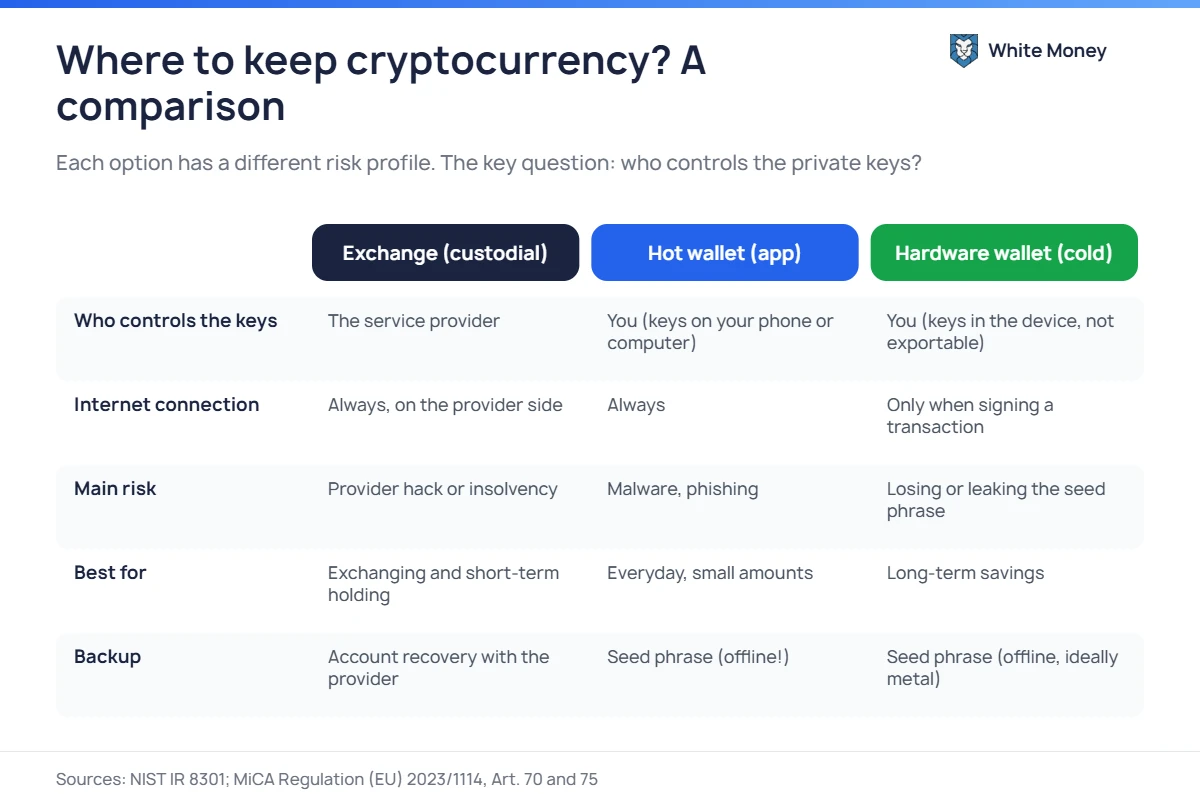
| Exchange / provider | Software wallet (hot) | Hardware wallet (cold) | |
|---|---|---|---|
| Private keys | held by the provider | on your phone or computer | in the device’s secure chip, cannot be exported |
| Main risk | hack, insolvency or account freeze at the provider | malware, phishing, fake apps | loss or leak of the seed phrase |
| Convenience | highest | high | medium - every transaction needs the device |
| Best for | exchanging and short-term holding | everyday, smaller amounts | long-term savings |
Keeping crypto with a provider (custodial)
This is the simplest option: you log in and see your balance. The EU MiCA Regulation imposes specific duties on authorised crypto-asset service providers: they must segregate client assets from their own (including in case of insolvency), keep a register of each client’s positions, send a statement of holdings at least every three months and are liable for losses they cause (Articles 70 and 75). At the same time, European supervisors point out that there is no compensation scheme for crypto-assets comparable to bank deposit guarantees. You can check a provider’s status in the ESMA register.
Software wallet (hot wallet)
An app on your phone, computer or a browser extension. Only you hold the keys, but the device is always online, so it is exposed to trojans that swap addresses in the clipboard, fake apps in app stores and sites that phish for seed phrases. Install a wallet only from the developer’s official website and keep in it only what you would carry in your pocket.
Hardware wallet (cold wallet)
A small device that generates and stores keys in a secure chip and signs transactions internally - the key never leaves the device. Two rules matter most: buy only from the manufacturer or an authorised reseller, and always verify the recipient address on the device’s own screen, not just on your computer.
For larger amounts and businesses: a multisig wallet requires m of n signatures (e.g. 2 of 3) to move funds. Losing one key does not mean losing the money, and a thief needs more than one device.
3. The recovery (seed) phrase - the 12 or 24 words that matter most
Most wallets use the BIP-39 standard: from a list of 2,048 words it creates a phrase of 12, 15, 18, 21 or 24 words that includes a checksum. All keys can be restored from the phrase - which is why revealing it is the same as handing over your funds. An optional extra passphrase creates an entirely different set of keys and protects you if the phrase alone is stolen.
- write the phrase down offline - ideally on a metal plate resistant to fire and water,
- keep copies in two separate, secure places,
- do not take photos or screenshots, email it or keep it in the cloud or a notes app,
- enter the phrase only on the device itself when restoring - never on a website,
- remember: no exchange employee, exchange office or “technical support” has any reason to ask for it.
4. Secure your accounts: passwords and two-factor authentication
NIST’s latest guidelines (SP 800-63B-4, 2025) classify SMS codes as a “restricted” method and require services to offer at least one phishing-resistant option. In practice, the order of preference is:
- a FIDO2 hardware key or passkey - the key is bound to a specific domain, so a fake site cannot capture it,
- an authenticator app with one-time codes (TOTP) or in-app confirmation,
- SMS - better than nothing, but vulnerable to number takeover (SIM swapping), which ENISA warns about.
Your password should be unique and long - NIST recommends at least 15 characters when it is the only login factor. Use a password manager, protect the email account linked to your exchange with 2FA as well, and enable a withdrawal address whitelist if your provider offers one.
5. Physical security, privacy and inheritance
So-called wrench attacks - robberies in which criminals force the victim to make a transfer - are on the rise. Chainalysis counted 46 such incidents in the first half of 2026 alone and advises holders not to disclose their holdings publicly. Do not show off your balance on social media, and do not keep a hardware wallet together with its seed phrase.
Think about your family too: without instructions, heirs may never recover the funds. Prepare sealed information on where the devices and phrase copies are and how to use them - but do not put the phrase itself in a will that passes through many hands.
6. Security checklist
- Split your funds: a small amount in a software wallet, savings in a hardware wallet.
- Buy devices and download apps only from the manufacturers’ websites.
- Write the seed phrase down offline, in two places, never in digital form.
- Enable 2FA based on a hardware key, passkey or app - not SMS.
- Update device firmware only through the official app.
- Check the recipient address in full on the hardware wallet’s screen.
- For large amounts, first send a small test transaction and check it in a block explorer.
- Never copy addresses from your transaction history - that is the address poisoning trap.
Read more about transfer pitfalls in our articles on choosing the right USDT network and the most common crypto scams.
7. Frequently asked questions
Is it safe to keep crypto on an exchange?
For a short time and with an authorised provider, it is an acceptable option. Remember, though, that you do not control the keys and the funds are not covered by guarantees like bank deposits. Long-term savings are better moved to a wallet you fully control.
What happens if I lose my hardware wallet?
Your funds are not lost - they are on the blockchain. You buy a new device (even from another BIP-39-compatible manufacturer) and restore the wallet from the seed phrase. That is why the phrase backup matters more than the device itself.
Can I take a photo of my seed phrase “just in case”?
No. Photos sync to the cloud, end up in backups and are targeted by malware. The phrase should exist only on paper or metal.
How many wallets do I need?
Two are enough for most people: a software wallet for everyday spending and exchanges, and a hardware wallet for savings. For large amounts, consider multisig.
Sources
- NIST IR 8301 - Blockchain Networks: Token Design and Management Overview (PDF)
- BIP-39 - recovery phrase standard
- NIST SP 800-63B-4 - Authentication guidelines
- FIDO Alliance - What are passkeys
- ENISA - How to avoid SIM swapping
- CERT Polska - Two-step verification (in Polish)
- Regulation (EU) 2023/1114 (MiCA) - EUR-Lex
- EBA, EIOPA and ESMA - consumer warning on crypto-assets (PDF)
- Chainalysis - crypto stolen in 2025
- Chainalysis - wrench attacks in 2026
- Trezor - best practices for securing your wallet backup
Leave a Reply