

The blockchain is public: you can check any transaction yourself, without logging in or asking anyone’s permission. All you need is the transaction ID (TXID) and a block explorer for the right network. It is the fastest way to confirm that a transfer was sent, how many confirmations it has and whether it reached the correct address - and, if something goes wrong, to give support concrete data instead of a screenshot. We show you how to read an explorer step by step.
Key points
- A TXID (transaction hash) is a unique identifier - use it to find the transaction in the explorer of the right network.
- Each network has its own explorer: Bitcoin - e.g. mempool.space, Ethereum - Etherscan, Tron - Tronscan, BNB Smart Chain - BscScan.
- A “Success” status and the required number of confirmations mean the funds are at the recipient’s address.
- For token transfers (e.g. USDT), the recipient and amount are shown in the “Token Transfers” section, not in the “To” field alone.
- An explorer only shows public data - never enter your seed phrase or private key in it.
1. What a block explorer and a TXID are
A block explorer is a search engine for a blockchain. It shows the blocks, addresses and transactions recorded on a given network. Each transaction has its own hash - a string of 64 hexadecimal characters (on Ethereum and BNB Smart Chain preceded by the 0x prefix). That is the TXID.
Where can you find it?
- in your wallet - in the transaction history, after opening the transfer details,
- on an exchange - in the withdrawal history, usually labelled “TxID”, “Hash” or “Transaction ID”,
- at an exchange service - in the order confirmation or account history.
2. Explorers for popular networks
Every blockchain has its own explorer - you will not find a Tron TXID on Etherscan. If a search returns nothing, first check that you are using the explorer for the right network.
| Network | Example explorer | TXID format | Address format |
|---|---|---|---|
| Bitcoin | mempool.space | 64 hex characters | bc1…, 1… or 3… |
| Ethereum | etherscan.io | 0x + 64 characters | 0x… (42 characters) |
| Tron | tronscan.org | 64 hex characters | T… (34 characters) |
| BNB Smart Chain | bscscan.com | 0x + 64 characters | 0x… (42 characters) |
Type explorer addresses manually or use bookmarks - fake copies appear in search results and ads.
3. How to read a transaction, field by field
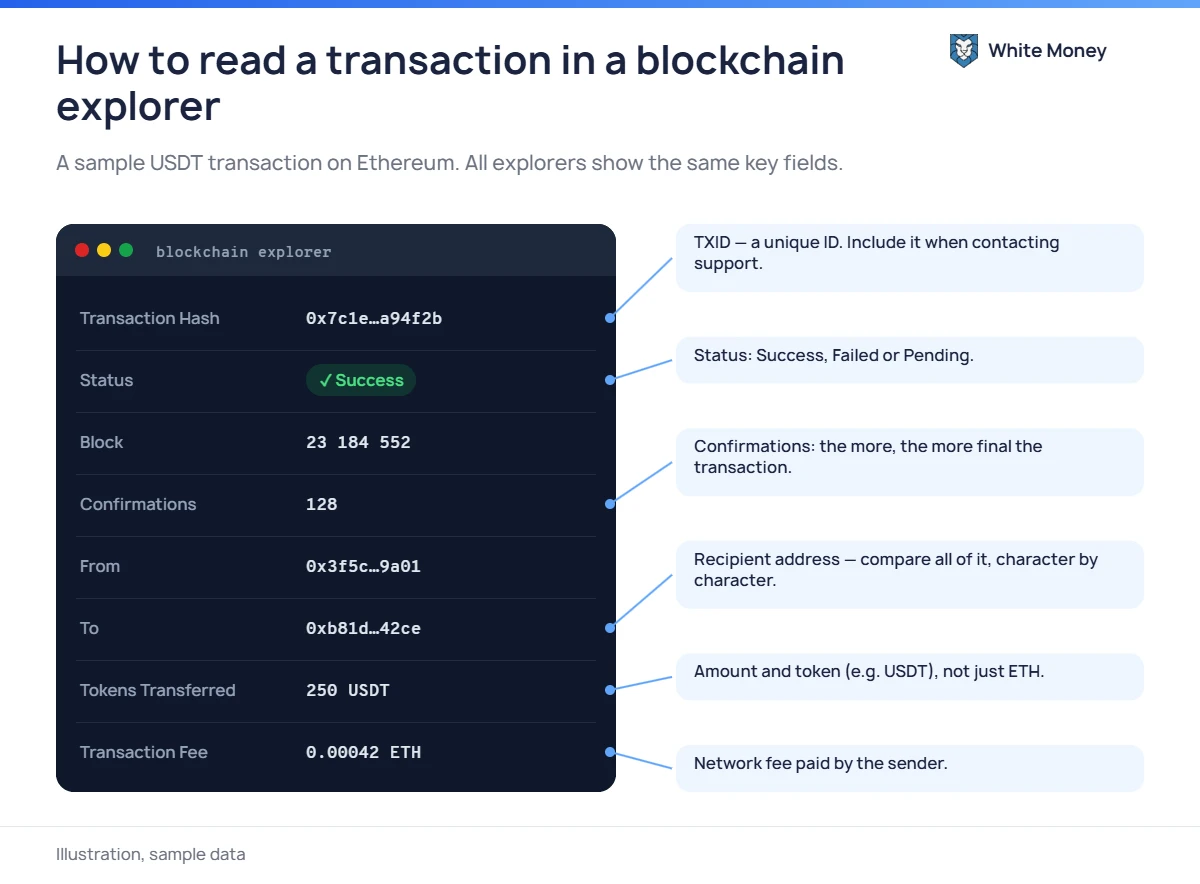
- Transaction Hash - the TXID; give it to support if something is wrong.
- Status - Success, Failed or Pending (details below).
- Block - the number of the block that contains the transaction; no number means it is still waiting in the queue.
- Confirmations - the number of blocks added after the block with your transaction; the more, the more certain it is.
- From / To - the sender’s address and the address it interacted with. Note: for a token transfer, the “To” (or “Interacted With”) field often shows the token contract address, not the recipient.
- Token Transfers - the actual recipient, the token name and the amount. Check that the token is the official USDT and not a fake with the same name.
- Transaction Fee - the network fee paid by the sender in the native coin (BTC, ETH, TRX, BNB).
4. Transaction statuses and what they mean
| Status | What it means | What to do |
|---|---|---|
| Pending | The transaction is waiting in the queue (mempool) to be included in a block. | Wait; on Bitcoin and Ethereum you can speed it up in your wallet if the fee was too low. |
| Success | The transaction is in a block and was executed. | Check the recipient address and the number of confirmations. |
| Failed | The transaction was included in a block but execution failed - e.g. on Tron due to insufficient Energy, on Ethereum due to insufficient gas. | The tokens were not sent, but the fee is lost. Retry with enough of the native coin. |
| Dropped / Replaced | The transaction was removed from the queue or replaced by another one (e.g. a sped-up version). | Find the new transaction and its TXID in your wallet. |
| Not found | Wrong network in the explorer, or the transaction has not been broadcast yet. | Switch explorers or wait a few minutes. |
5. Confirmations and finality
The first confirmation means the transaction has been included in a block. Each further block makes reversing it practically impossible. On Bitcoin, a block is produced on average every 10 minutes, and many services wait for several confirmations. On Tron, Ethereum and BNB Smart Chain, what matters is finality - from about 1 second to about 15 minutes. See the comparison in USDT on TRC-20, ERC-20 or BEP-20.
That is why a transaction can show “Success” in the explorer while the recipient - e.g. an exchange - has not credited it yet: it is waiting for the required number of confirmations.
6. What to do if a transfer “hasn’t arrived”
- Find the TXID and open it in the explorer for the right network.
- If the status is Pending, wait or speed up the transaction in your wallet.
- If it is Failed, the funds did not leave your wallet (apart from the fee); send the transfer again.
- If it is Success, compare the full recipient address in Token Transfers with the address you were given, and check the network.
- If everything matches, the funds are with the recipient - contact their support with the TXID, amount and time of the transaction.
- If the address or network does not match, act immediately: contact the recipient (e.g. the exchange) and read our guide on networks.
Beware of “helpers”. People in comments or on Telegram who offer to “unlock” a missing transfer are almost always scammers. Read more in our article on crypto scams.
7. Privacy: the blockchain is transparent
Anyone who knows your address can see its balance and entire transaction history. Do not publish addresses linked to your identity, and for larger holdings consider separate addresses for different purposes. Transparency has its advantages too: a TXID is proof of a transfer, which is useful for example when reporting crypto tax.
8. Frequently asked questions
Can someone steal my funds if they know my TXID or address?
No. A TXID and an address are public information - spending funds requires the private key. Revealing your address only affects your privacy.
The transaction shows Success, but the exchange doesn’t see the funds. Why?
Most often the required confirmations are missing, a network or token the exchange does not support was used, or a required memo/tag was omitted. Contact support with the TXID.
Can I cancel a transaction I have sent?
Only while it is Pending - some wallets let you replace it with another one. Once it is in a block, the transaction cannot be reversed.
Why did I pay a fee for a failed transaction?
Because the network did the work - it processed the transaction in a block - even though execution failed. The most common cause is too little gas or Energy.
Sources
- ethereum.org - transactions
- ethereum.org - block explorers
- ethereum.org - gas and fees
- Bitcoin Developer Guide - verifying payment and confirmations
- TRON Developer Hub - resource model (Energy and Bandwidth)
- TRON Developer Hub - consensus and block finality
- BNB Chain - BNB Smart Chain documentation
- Etherscan - what is address poisoning
- Chainalysis - address poisoning
Leave a Reply